


Search FAQs
Browse by Product
How do I forward ports, create pin holes in the firewall or create Virtual Servers in my TEW-632BRP?
FAQ ID: 1418 Product: TEW-632BRPUpdated:1/19/2008 12:37:49 AM
For Well Known Ports
- Log into the Router by entering its IP address into a browser. The default IP address is https://192.168.10.1. At the login, enter your username (admin) and password (admin).
- Click on "Cancel" if the Setup Wizard comes up.
- Click on "Access" on the left hand side.
- Click on "Virtual Server".
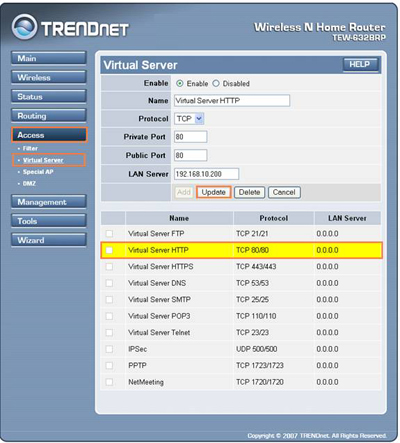
- Highlight the Service under the Name section.
- Select Enable.
- Type the IP address of computer that you want the port forwarded to in the LAN Server field.
- Click "Update".
- Log into the TEW-632BRP by entering its IP address into a browser. The default IP address is https://192.168.10.1. The default username and password are both "admin".
- Click on "Accesss" on the left hand side then click on "Virtual Server".
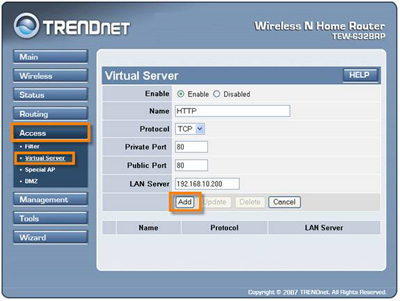
- Select "Enable".
- Enter a name for the virtual server.
- Choose the protocol (e.g. TCP, UDP or * (TCP and UDP)).
- Enter in the private and public port. Public and Private Port should be the same.
- Enter in the IP address of the PC you want to forward the ports to in the LAN Server field.
- Click "Add"
Related FAQs:
Attachments:
No attachments found.