


Search FAQs
Browse by Product
How do I configure encryption on my wireless adapter?
FAQ ID: 1448 Product: TEW-421PCUpdated:1/22/2008 2:06:42 AM
Open the utility by double clicking on the icon at the bottom right hand side of the screen.

XP
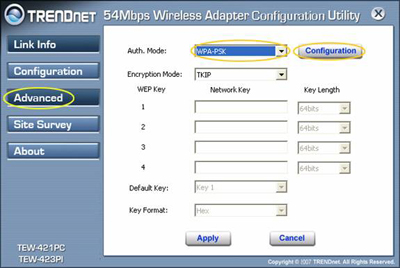
Click on the "Advanced" tab. Then on the authentication tab set it to "WPA-PSK" to encrypt. Next select the "Configuration" tab.
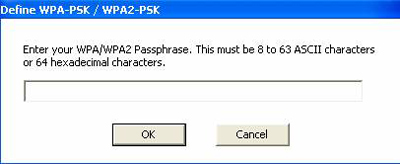
Next type in your passphrase and the encryption will now be set.
Related FAQs:
- I cannot open the wireless configuration utility. What should I do?
- I completed all the steps in the quick installation guide, but my card isn't connecting to my access point. What should I do?
- Why is the Wireless Networks tab missing under the properties of my wireless network connection?
- Windows is unable to recognize my hardware. What should I do?
- How do I use Windows to configure my wireless adapter?
Attachments:
No attachments found.