


Search FAQs
Browse by Product
Where can I find the MAC Address of my TW100-BRF114?
FAQ ID: 1075 Product: TW100-BRF114Updated:4/11/2006 7:00:35 PM
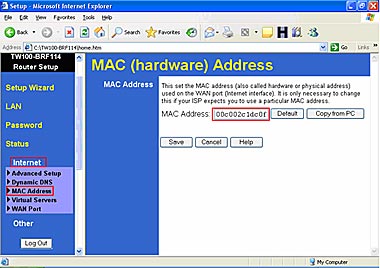
The MAC Address can be found on a label on the bottom of the Router. You can alternately find it by doing the following:
- Open your web browser and type the IP address of the TW100-BRF114 in the address bar. The default IP address is 192.168.0.1. At the login, enter your username (blank) and password (blank). NOTE: If the Setup Wizard starts, click on Cancel.
- Click on LAN at the top of the page.
- The MAC Address is listed next to the WAN Port MAC Address field.
Related FAQs:
Attachments:
No attachments found.