


Search FAQs
Browse by Product
How do I configure the TW100-BRF114 for a DSL, PPPoE connection?
FAQ ID: 1067 Product: TW100-BRF114Updated:4/11/2006 6:42:51 PM
Open your web browser and type the IP address of the TW100-BRF114 in the address bar. The default IP address is 192.168.0.1. At the login, enter your username (blank) and password (blank). NOTE: If the Setup Wizard starts, click on Cancel.
Click on Advanced then WAN Port on the left hand side.
- Choose PPPoE for the Login Method in the Login section.
- Enter your Username and Password provided by your ISP (Internet Service Provider).
- Click on the down arrow for the Connection behavior and select "keepalive".
- Click Save.
Note: After you save the settings you may need to power cycle the modem and Router.

- Disconnect the power cycle from the modem and Router.
- Wait approximately 15 seconds.
- Reconnect the modem first and wait for it to boot up.
- After the modem has booted up reconnect the Router.
- Open your web browser and type the IP address of the TW100-BRF114 in the address bar. The default IP address is 192.168.0.1. At the login, enter your username (blank) and password (blank). NOTE: If the Setup Wizard starts, click on Cancel.
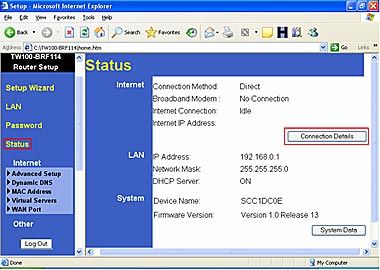
- Go to Status on the left hand side of the screen and then click on Connection Details. This will open a new window.
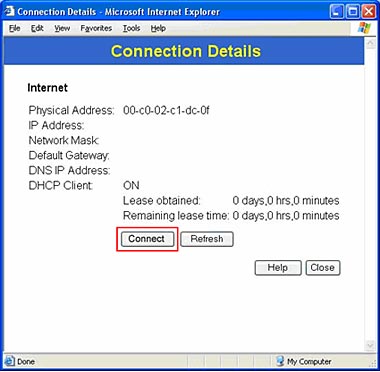
7. Click on Connect, wait a few seconds and see if it gets an IP address from your ISP.
Related FAQs:
Attachments:
No attachments found.