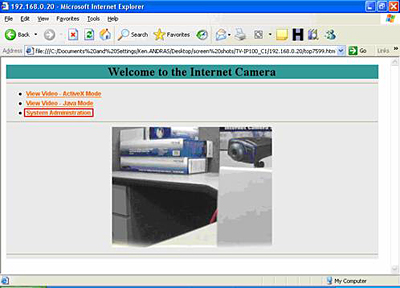
Step 1 Open your web browser and type the IP address of the TV- IP100 (C1) in the address bar. The default IP address is 192.168.0.20.
Step 2 Click on "System Administration".
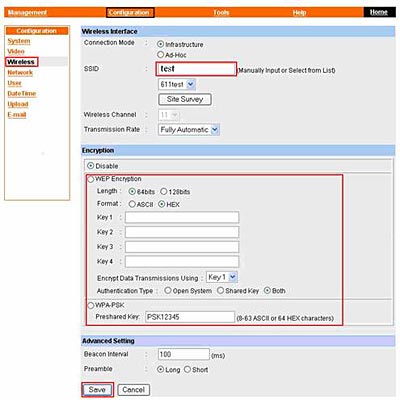
Step 3 Click on "Configuration" at the top of the screen then "Wireless" on the left hand side of the screen.
Step 4 Input the ESS-ID, Channel and if you have Encryption setup on our
network, you will need to input that information as well, the click "Save".
Note: All information has to match that of your wireless Router or access
point.
Step 5 After saving the information, unplug the Ethernet cable from the back
of the camera, next, unplug the power from the back of the camera for 10
seconds.
Step 6 Plug the power back into the camera and wait for 30 seconds.
Step 7 Open your web browser and type the IP address of the TV- IP100 (C1)
in the address bar. The default IP address is 192.168.0.20.
- How can I view the TV-IP100 (w) remotely if it’s behind a router or firewall?
- How do I reset my TV-IP100 (C1) back to factory defaults?
- What is the default IP address of my TV- IP100 (C1)?
- How do I configure the camera to record motion?
- How do I configure my TV-IP100 (C1) series cameras to upload snapshots to an FTP server?