


Search FAQs
Browse by Product
How do I setup my wireless settings?
FAQ ID: 1041 Product: TEW-PS1UUpdated:4/10/2006 9:16:58 PM
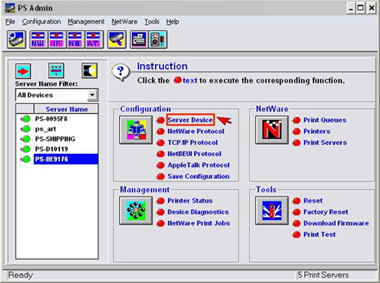
Step1. Click on Server Device.
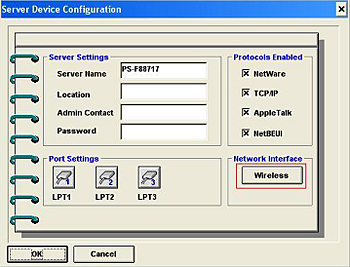
Step2. Click on the Wireless button.
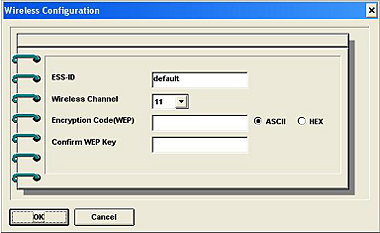
Step3. Input the ESS-ID and channel of your wireless access point or Router. If you are using Encryption on your wireless network, you will be required to input the WEP key. For 64 bit hex you will be required to input 10 characters and for 128 bit WEP, you will be required to input 26 characters. If you are using ASCII you will be required to input 5 characters for 64 bit and 13 characters for 128 bit encryption then click OK.
Related FAQs:
Attachments:
No attachments found.