


Search FAQs
Browse by Product
How do I forward ports in my TW100-BRF114?
FAQ ID: 1076 Product: TW100-BRF114Updated:4/11/2006 7:01:50 PM
Open your web browser and type the IP address of the TW100-BRF114 in the address bar. The default IP address is 192.168.0.1. At the login, enter your username (blank) and password (blank). NOTE: If the Setup Wizard starts, click on Cancel.
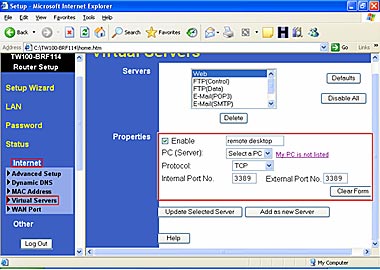
- Put a check mark in the Enable box. Rename the service, select the PC that you want the port forwarded too, select TCP, UDP or both TPC/UDP for the protocol, then input the port (if it's a single port, enter the port in both box's and the port range in the Internal LAN Ports or input the port if in a range), input the port needed on the External WAN Port (this port is usually the same port as the LAN port), then click Add as new Server.
Related FAQs:
- How do I change the username & password on my TW100-BRF114?
- How do I configure the TW100-BRF114?
- What is the default username and password for the TW100-BRF114?
- How do I configure the TW100-BRF114 for a DSL, PPPoE connection?
- What can I do if I forgot my password or want to reset back to factory defaults?
Attachments:
No attachments found.