


Search FAQs
Browse by Product
How do I change the IP Address of my TW100-BRF114U?
FAQ ID: 1083 Product: TW100-BRF114UUpdated:4/11/2006 8:17:20 PM
1. Open your web browser and type the IP address of the TW100-BRF114U in the address bar. The default IP address is 192.168.0.1. At the login, enter your username (blank) and password (blank). NOTE: If the Setup Wizard starts, click on Cancel.
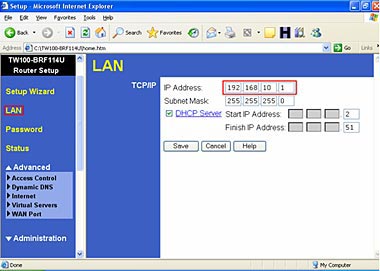
2. Click on LAN on the left hand side.
3. Change the IP address in the IP Address field.
4. Click Save.
Related FAQs:
Attachments:
No attachments found.