


Search FAQs
Browse by Product
How do I change the username & password on my TW100-BRF114U?
FAQ ID: 1079 Product: TW100-BRF114UUpdated:4/11/2006 8:13:21 PM
A: Open your web browser and type the IP address of the TW100-BRF114U in the address bar. The default IP address is 192.168.0.1. At the login, enter your username (blank) and password (blank). NOTE: If the Setup Wizard starts, click on Cancel.
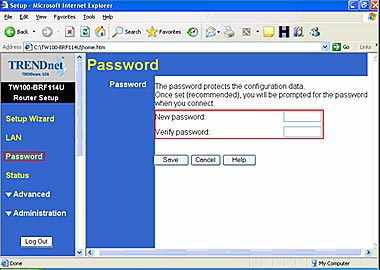
1. Click on Password on the left hand side.
2. Enter in the desired username and password.
3. Click Save.
Related FAQs:
Attachments:
No attachments found.