How do I configure my email settings?
FAQ ID: 1304 Updated: 4/24/2007 2:18:01 AM
Step 1 Start the IPView Pro Program by going to Start>Programs>IPView Pro>IPView Pro.
Step 2 Click on "System Configuration".
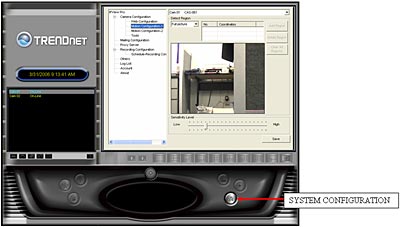
Step 3 Click on "Mailing Configuration" and enter in your settings.
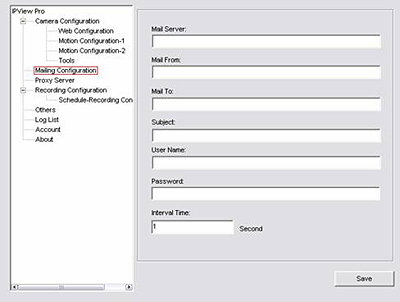
Mail Server: Mail Server IP or Name.
Mail From: E-Mail Address of sender.
Mail To: E-Mail Address of receiver.
Subject: Can be any information to high light the message.
User Name: Enter the user name in this field.
Password: Enter the user password in this field to login receiver's mail server.
Interval Time: The time interval to send the next E-Mail.
Then click "Save".
Related FAQs:
- How do I configure my TV-IP201 (w) series cameras to upload snapshots to an FTP server?
- How do I upgrade the firmware of my camera?
- How do I reset my TV-IP201 (w) back to factory defaults?
- How do I configure the camera to record motion?
- How can I view the TV- IP201 (w) remotely if it’s behind a router or firewall?
Attachments:
No attachments found.