


Search FAQs
Browse by Product
How do I configure my camera to upload snapshots to an FTP server?
FAQ ID: 2065 Product: TV-IP512PUpdated:8/6/2009 11:46:15 AM
Log into the camera by entering the camera's IP address into your browser. The default IP address is https://192.168.10.30. The default username and password are both "admin".
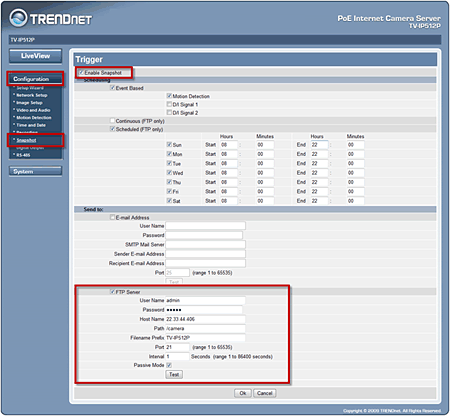
Once you have logged into the camera click on Configuration>Snapshot and place a check mark into "Enable Snapshot. Enter in your FTP server information and define your FTP event. You can choose either Continuous or Scheduled.
Related FAQs:
Attachments:
No attachments found.