


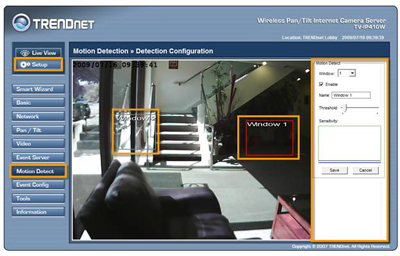
Log into the camera and click on Setup. Click on Motion Detect on the left hand side. On this page you can setup two motion detection windows. Under "Window" you can select either 1 or 2. Place a check in "Enable" to turn on motion detection. You can adjust the threshold for each window individually. Sliding the bar to the left lowers the sensitivity threshold and sliding the bar to the right raises it. For motion to be triggered the motion event must go higher than the sensitivity bar.
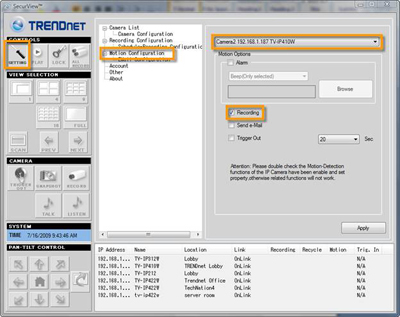
Launch SecurView and click on the "Setting" button. Click on Motion Configuration, select your camera and place a check mark in "Recording" under the Motion Options field. Click Apply.
When motion is triggered it will record to the specified path under Recording Configuration.
- What is the default IP address of my TV-IP410 (w)?
- How do I upgrade the firmware of my camera?
- What are the recommended system specs for SecurView?
- Why is it when I tell the camera to auto patrol, it only pans through the positions once?
- How do I set a password on my TV-IP410 (w) and create user accounts?