


Search FAQs
Browse by Product
How do I set a password on my TV-IP400(w)?
FAQ ID: 687 Product: TV-IP400Updated:12/20/2005 3:06:06 PM
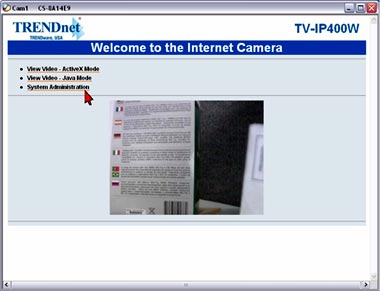
Step 1 Open your web browser and type the IP address of the TV-IP400(w) in the address bar. The default IP address is 192.168.0.20.
Step 2 Click System Administration.
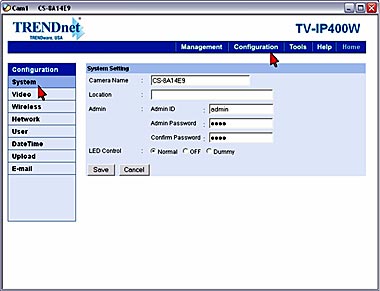
Step 3 Click Configuration at the top of the page then click System on the left hand side. Enter in the desired username and password in the Admin ID and Admin Password fields. Click Save.
Related FAQs:
- How do I reset my TV-IP400(w) back to factory defaults?
- How can I view the TV-IP400(w) remotely if it’s behind a router or firewall?
- How do I view the TV-IP400(w)’s image using IPView SE?
- How can I configure my TV-IP400(w) through the web-based configuration?
- Which web browsers will allow me to view the video from a TV-IP400(w)?
Attachments:
No attachments found.