


Search FAQs
Browse by Product
How do I reset my TV-IP400(w) back to factory defaults?
FAQ ID: 685 Product: TV-IP400Updated:12/20/2005 3:01:37 PM
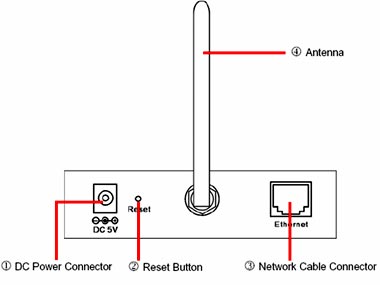
Step 1 Locate the reset button on the back of the unit
Step 2 Disconnect the power supply.
Step 3 Press and hold in the reset button.
Step 4 While holding in the reset button; reconnect the power supply.
Step 5 Continue to hold in the reset button for approximately 10 seconds to restore the default settings.
Related FAQs:
- How do I set a password on my TV-IP400(w)?
- How can I view the TV-IP400(w) remotely if it’s behind a router or firewall?
- How do I view the TV-IP400(w)’s image using IPView SE?
- How can I configure my TV-IP400(w) through the web-based configuration?
- Which web browsers will allow me to view the video from a TV-IP400(w)?
Attachments:
No attachments found.