


Search FAQs
Browse by Product
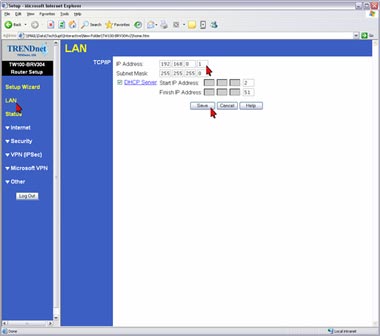
How do I change the IP Address of my TW100-BRV204/304?
FAQ ID: 748 Product: TW100-BRV204Updated:1/30/2006 5:03:25 PM
1) Open your web browser and type the IP address of the TW100-BRV204/304 in the address bar. The default IP address is 192.168.0.1. At the login, enter your username (blank) and password (blank).
2) Click on LAN on the left hand side.
3) Change the IP address in the IP Address field then click Save.
Related FAQs:
- How do I configure a VPN tunnel when one side has a dynamic IP address?
- How do I connect using a the Microsoft VPN Client?
- How do I forward ports in my TW100-BRV204/304?
- How do I configure a VPN tunnel with both sides having static IP addresses?
- I specified the IP address, 192.168.0.1 in my internet browser, but the bowser comes back with "The page cannot be displayed". How can I get into the TW100-BRV204 web configuration page?
Attachments:
No attachments found.