


Search FAQs
Browse by Product
How do I forward ports in my TW100-BRV204/304?
FAQ ID: 767 Product: TW100-BRV304Updated:1/30/2006 8:08:53 PM
Well Known Ports
1) Open your web browser and type the IP address of the TW100-BRV204/304 in the address bar. The default IP address is 192.168.0.1. At the login, enter your username (blank) and password (blank).
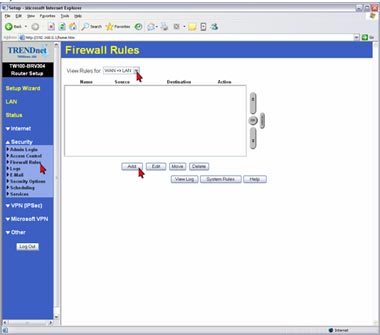
2) Click Security then Firewall Rules on the left hand side.
3) Select WAN=>LAN in the drop down menu in the View Rules for category.
4) Click Add.
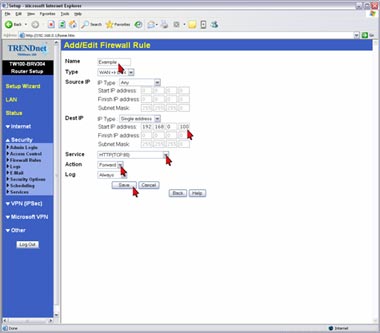
5) Give the rule a name. Enter in the IP address of the computer you want the port forwarded to. Select the service that you want forwarded. Select Forward in the action menu then click Save.
Note: For a custom service you must add the service first.
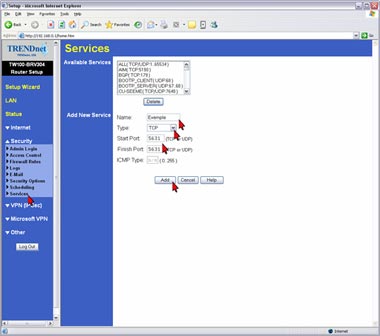
1) Click Security then Services on the left hand side.
2) Enter in a Name, Type, Start and Finish ports then click Add.
Related FAQs:
- When I attempt to access http://192.168.0.1 with my web browser, an error message tells me "The page cannot be displayed." How can I get into the TW100-BRV304 web configuration page?
- How do I connect using a the Microsoft VPN Client?
- How do I configure a VPN tunnel with both sides having static IP addresses?
- I set up my Internet Connection Type and saved it, but I still cannot access the Internet with my PC. What should I do?
- How do I configure a VPN tunnel when one side has a dynamic IP address?
Attachments:
No attachments found.